


How to Book a Move With Tingsapp: A Step-by-Step Guide
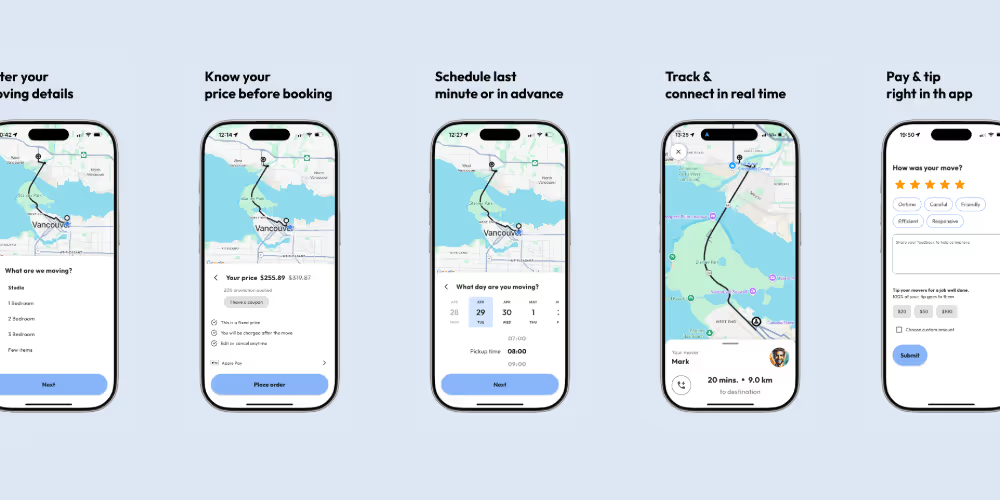
Booking a move on Tingsapp takes about five minutes and five steps: enter your move details, see a fixed price, pick a date, track the crew on the day, and pay and tip in the app. There's no account to set up first and no phone call. The one thing that decides whether the price you see matches the job is how accurately you describe what you're moving — this guide covers each step and what to have ready so the number holds.
Before You Start: Gather This
- Your pickup and drop-off addresses, including floor and unit numbers
- A rough room-by-room sense of your inventory — beds, sofas, tables, dressers, appliances, and an approximate box count
- Access details at both ends: stairs and how many flights, elevator (and whether it needs booking), and how close a truck can park
- Any items that need special handling — a piano, a safe, a large aquarium, oversized art
- Your preferred date, plus a backup
Having this in front of you means you enter it once and the price reflects the real job. Vague inputs are what cause a quote to feel off.
Step 1: Enter Your Moving Details
Open the app or go to the booking page and enter:
- The move type — studio, one-bedroom, two-bedroom, full home, small move, or a few specific items.
- Both addresses, with floor and unit.
- Notes for the crew — stair count, elevator status, parking or loading-zone limits, and anything fragile or oversized. These notes change how the crew plans and, on some moves, the price, so be complete rather than optimistic.
Your account is created automatically when the booking completes — there's no separate sign-up.
Step 2: See Your Price Before You Commit
Once the details are in, the app calculates a fixed total. It's not an hourly estimate that moves on the day — the number shown before you confirm is what you pay when the move is done, with no service fees added.
If the price looks higher or lower than you expected, that usually traces to the inventory or the access details. Adjust them to match reality rather than to move the number — an underquoted move that runs into extra scope on the day is the outcome fixed pricing exists to prevent. For how any moving quote is built and what each part means, see how to read and compare a moving quote.
Step 3: Choose Your Date and Time
You can book a last-minute move or schedule up to 30 days ahead, any hour of the day. If your dates are flexible, the cost lever is timing:
- Cheapest and easiest to book: mid-week, mid-month, October through April.
- Busiest and priciest: the last three days and first day of the month, weekends, and May through September.
A few days of lease overlap can cost less than the premium for a peak-day move. The cheapest months to move and how to move for less cover the timing in full. Plans can change — you can reschedule or cancel in the app. For how far ahead to book in the first place, local or interprovincial, see when to book movers.
Step 4: Track the Crew on Moving Day
From the moment the crew is en route, the app shows their location and an arrival estimate, and lets you message them directly — useful for a gate code, a parking instruction, or a heads-up that you're five minutes out. No phone numbers exchanged, no calling around for a status.
Have everything packed and stacked by the door before they arrive; idle time while you finish packing is the most common way a move runs long. The moving-day checklist covers the rest of the prep, and the mistakes to avoid are worth a read before the day.
Step 5: Pay and Tip in the App
When the move is done, payment runs through the app — major credit cards, Apple Pay, and Google Pay, no cash needed — and a detailed invoice is generated automatically. You then rate the crew and can add a tip, which goes entirely to the movers who did the job. The whole close-out takes under a minute.
If you'd rather not keep an account, you can delete it in the app after the move.
What Each Step Needs From You
| Step | What you provide | Why it matters |
|---|---|---|
| 1. Details | Addresses, move type, inventory, access notes | Accuracy here is what makes the fixed price match the job |
| 2. Price | A review of the quote against your real inventory | Catches an under- or over-estimate before you book |
| 3. Date | Your preferred and backup dates | Off-peak dates cost less and book more easily |
| 4. Moving day | Be packed and reachable in the app | Idle time is the main cause of a move running long |
| 5. Payment | Card or mobile pay; a rating and optional tip | Closes the booking; the tip goes fully to the crew |
Services You Can Book
Tingsapp covers full home moves, small moves, last-minute moving, and store delivery across Metro Vancouver and the Lower Mainland — Vancouver, Surrey, Burnaby, Richmond, Coquitlam, North and West Vancouver, Langley, New Westminster, and surrounding communities, plus other hub cities. It doesn't handle packing services, storage, pianos and safes, or long-distance moves; how the booking models compare covers when a different option fits better. Check your area to confirm availability.
Related guides
- Booking a Local Move: Company vs Van Line vs Platform
- Moving in St. Albert and Sherwood Park: Your Friendly Edmonton: Area Guide
- Moving in Lévis
- Tingsapp brings Uber-style moving help to Canadians
- When to Book Movers: Local vs Long: Distance Timelines
- Get an upfront moving price
Frequently Asked Questions
Do I need an account before booking on Tingsapp?
No. The account is created automatically when you complete your first booking — there's no registration step first, and you can delete the account in the app after your move.
Can I book a move with less than 24 hours' notice?
Yes, that's what the last-minute service is for. Availability depends on your location and date and shows at the time you book, so book as soon as you know the move is happening.
Can I cancel or reschedule?
Yes, directly in the app, with a few taps, if your plans shift before moving day.
Is the price I see before booking guaranteed?
Yes. It's a fixed total for the scope you entered — no hourly overruns or service fees added afterward. It changes only if you add items or services.
How do I reach the crew on moving day?
Through in-app messaging, once the booking is confirmed and the crew is en route. No phone numbers are exchanged.
What payment methods are accepted?
All major credit cards, Apple Pay, and Google Pay. Payment is processed in the app at the end of the move, and the invoice is generated automatically.
Book Your Move
Have your addresses, a rough inventory, and access details ready, and the whole booking takes about five minutes. Get a quote and book, or start with the moving-day checklist if your date is still a few weeks out.

Download Tingsapp
Book faster, track in real-time, and get exclusive offers on the go.
Planning a move?
Get your move booked today
Enter your move details to see an upfront price and find the right help for your move.
Book a move now